

Setting Up the RETOS Development Environment

* *For further information, refer RETOS Tutorial [PDF]
**
You should establish a cross-compile environment for developing sensor applications using RETOS for sensor node devices based on micro controllers. In this section, we describe how you can establish the RETOS development environment. A process for injecting RETOS kernel into sensor nodes, writing, compiling, and running RETOS applications is described in Chapter 2.
Followings are the requirements for establishing a development environment for RETOS and injecting the RETOS kernel and applications into sensor node devices. (For TmoteSky and Telos motes with TI MSP430 processors)
• A x86 PC with MS Windows
• At least 1 USB port for injecting THE RETOS kernel and applications to the motes
1.1 Installing Basic Development Environment
To establish THE RETOS development environment, following applications are required
• MS Windows + Cygwin on x86 PC
• MSP430 GCC compiler (msp430-gcc)
• MSP430 serial programmer (msp430-bsl)
• MoteList Utility (to check the list of TmoteSky or Telos motes connected to PC)
First of all, you should download Cygwin(http://www.cygwin.com/), MSP430 GCC, serial programmer and Motelist to install them. 1) you can download a MSP430 GCC installation file at http://mspgcc.sf.net 2) and a zip file for the MSP430 serial programmer(BSL: Boot Strap Loader) at http://moteiv.com/support/msp430-bsl.zip (this BSL is specially patched for TmoteSky and Telos motes, so you must download it through this web link) 3) you can also download MoteList at http://moteiv.com/support/motelist.zip. Then, unzip msp430-bsl.zip and
motelist.zip into the mspgcc/bin directory. After you finished installing all these three software, proceed to the next step.
Configuring PATH for msp430-bsl and MoteList will be useful since these are frequently used commands. You can do this by adding the following line at .bashrc file in your home directory (if .bashrc doesn't exist, make a new one)
e.g.) If msp430-bsl is installed at C:\Program Files\mspgcc\bin, add a following line at the end of .bashrc file.
• export PATH="${PATH}":/cygdrive/c/Program\ Files/mspgcc/bin
[TIP]
** If the development environment for TinyOS is already established on your system, you don't have to install Cygwin again. Check if msp430 cross compiler is already installed.
** If you have two cygwin1.dll file on the same computer, the cygwin will complain
about the compatibility issue. The mspgcc installation version automatically installs
additional cygwin1.dll into mspgcc/bin directory even though you have already
installed the cygwin. Therefore, you should delete cygwin1.dll in mspgcc/bin directory
to make everything work fine.
** The motelist utility requires VCP (Virtual COM Port) driver. The following chapter
describes how to install VCP driver.
1.2 USB Driver Installation & Configuration
TmoteSky and Telos include USB to Serial Converter, so the RETOS and its applications can be injected through it. Virtual COM Port driver should be installed to recognize your sensor motes and program the system on host PC. You can download it at Moteiv web site. (http://www.ftdichip.com/Drivers/VCP.htm) If you connect your sensor motes to your host PC after installing the VCP driver, each mote will be mapped to each COM port as in the following figure.
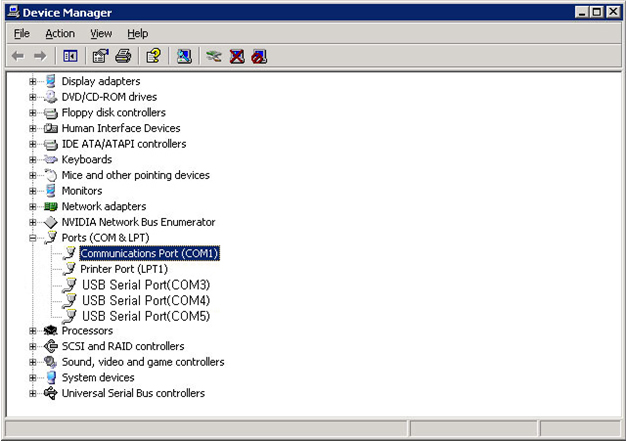
In this figure, three motes are connected to COM3, COM4 and COM5, respectively. This Virtual COM Port allows several motes to connect to the host PC and work simultaneously. Port numbers can be modified by changing COM Port Number at Port Setting > Advanced, and you can see the port number changed after reconnecting the mote of which you just changed the port number.
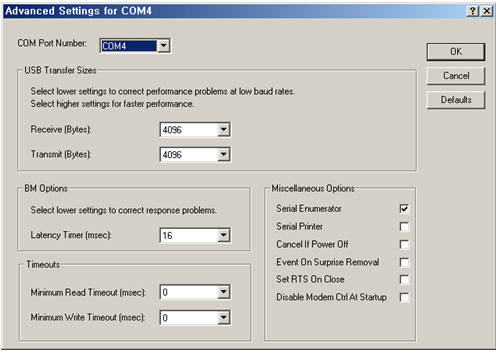
[Caution] Cygwin released before Oct. 2006 is compiled to recognize maximum 15 serial devices. Virtual COM ports should be mapped to COM1 to COM15 since the RETOS application installation tool injector uses the Cygwin standard library.
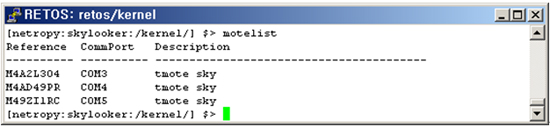
You can check if each mote is connected by typing “motelist” command.
1.3 RETOS Installation
You can install RETOS after finishing the previous section. You finish RETOS installation by downloading the RETOS kernel binary and application development tools and decompressing them into certain directory.
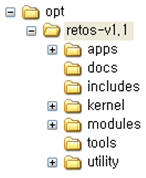
Following is the directory structure of RETOS v1.1 when you install it at /opt.
• /apps: Makerules for application sources and compilation
• /docs: User tutorial
• /includes: Header files for application compilation
• /kernel: Kernel binary
• /modules: Module binaries
• /tools: Tools for building and installing applications
• /utility: Makerules for host PC application sources and compilation
Copyright © 2007 Yonsei University. All rights reserved.
Yonsei University 134 Shinchon-dong, Seodaemoon-gu, Seoul, 120-749, Korea